Let guests download, with a password
Guest downloads are off by default. Switch them on under Album → Sharing and anyone who can open the album can download all of it as a ZIP, or a selection; add a download password and they need that as well.
A guest download only ever contains what the album shows: approved, not hidden, and voice messages only while both voice switches are on. It needs a paid plan, and it does not stop anyone saving a picture they are looking at.
Off until you say otherwise
A new album lets guests look but gives them no download button. That is deliberate: handing out copies of every file is a decision the host should make on purpose rather than by omission.
Switching it on takes 1 toggle and applies to everyone who can open the album, immediately. Switching it off again works the same way, and a download link a guest already started stops working.
- Switch guest downloads on. Under Album → Sharing, next to the album settings. Off is the default.
- Add a password if you want one. It gates downloading only. Opening the album is a separate album password.
- Tell guests it exists. Nobody looks for a download they were not told about.
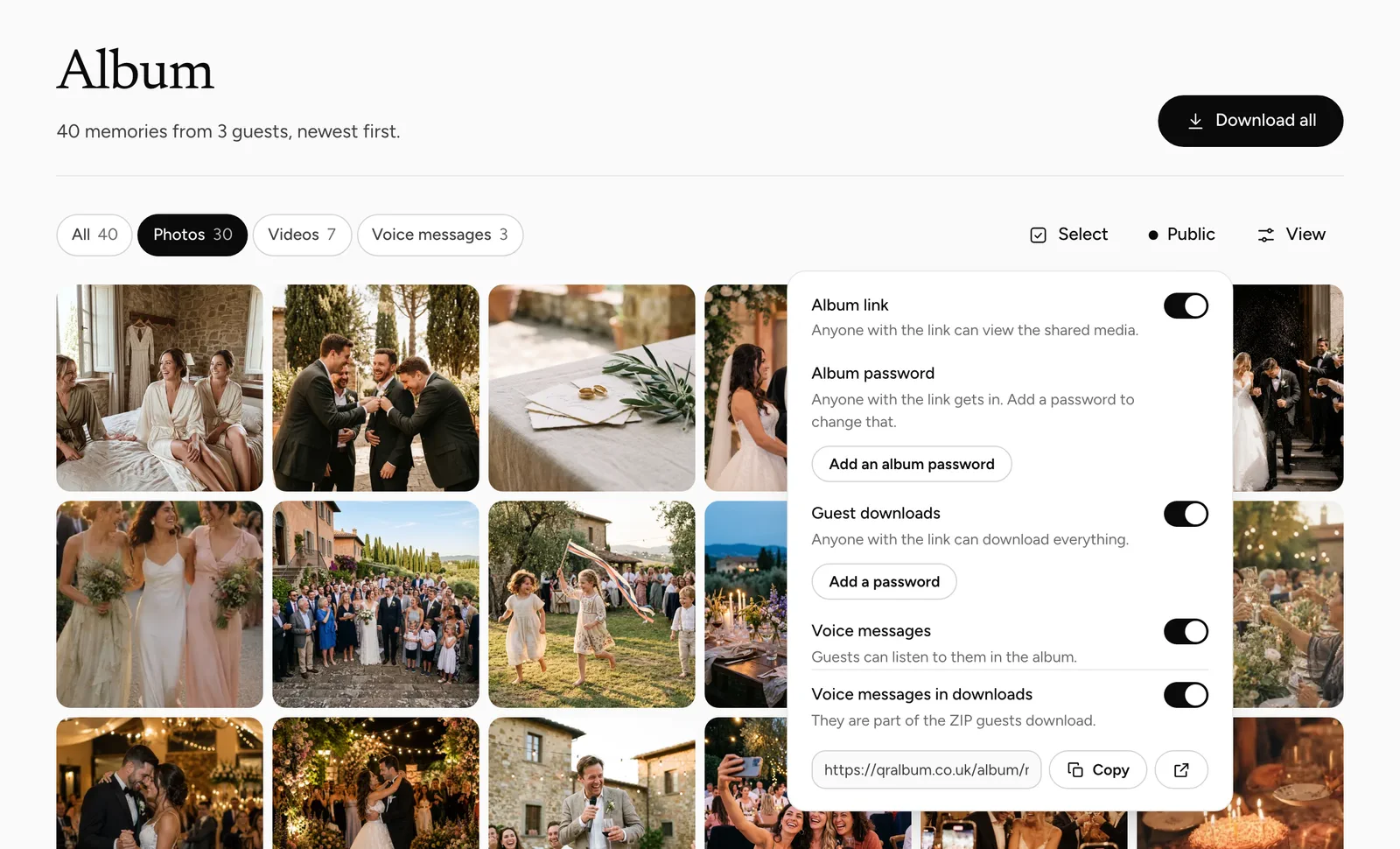
What a guest actually gets
Only what the album shows them: uploads that are approved, processed and not hidden. Anything you took out of the shared album stays out of the guest download too — otherwise the download would hand back exactly what you had just removed. Guests can take the whole album or pick up to 60 items.
Your own export is untouched by all of this. You always keep everything.
| Contains | Your export | Guest ZIP |
|---|---|---|
| Approved contributions | Yes | Yes |
| Items you hid | Yes | No |
| Items awaiting review | No | No |
| Voice messages | Yes | Only while both voice switches are on |
The guest ZIP is a subset of yours, never the other way round.
Voice notes are a separate decision
There are 2 switches for voice under Album → Sharing: “Voice messages” decides whether they appear in the album at all, and “Voice messages in downloads” whether guests may download them. Either one off keeps them out of the guest ZIP. A recorded message is more personal than a photograph, and it is reasonable to let people listen without handing out copies.
Both are on by default, so if you want them out you have to say so.
What the password does
It sits in front of downloading, and only that. Guests can still open the album and look; the download password is what they need to take the files. It is separate from the album password, which sits in front of viewing.
That combination is the useful middle ground: an open album for everyone, and the full files only for the people you gave the word to.
What switching downloads off cannot do
With guest downloads off there is no download button and no ZIP — but the album still shows every visible photo full size. Anyone who can open it can take a screenshot or save the picture they are looking at, as with any web page.
If a picture must not leave the album, hide it. If the album is meant for a small circle, put an album password in front of viewing rather than relying on the download switch.
It needs a paid plan
Downloads in original quality belong to the paid plans, and the guest download is one of them. On the free plan the switch cannot be turned on.
So this is a decision to make alongside the plan, not after the party.
Say that it exists
A download nobody knows about is not used. Put it in the message you send the next morning: the album is open, and you can take the pictures. That 1 line is what turns the switch into something people actually use.
If you set a password, send it in the same message rather than separately. A second message is 1 too many.
Common questions
Are guest downloads on by default?
No. They are off until you switch them on under Album → Sharing.
Do guests get the items I hid?
No. The guest download contains only what the album shows.
Are voice messages included?
Only if both “Voice messages” and “Voice messages in downloads” are on.
Is the download password the same as the album password?
No. One gates downloading, the other gates viewing, and you can use either or both.
Does this work on the free plan?
No. Original-quality downloads are part of the paid plans.
Does switching downloads off stop people saving photos?
No. It removes the download button and ZIP; a picture on screen can still be saved or screenshotted.
Download everything
Your own complete export.
Is your album private?
Who can open the album in the first place.
Hide or delete uploads
Keeping a picture out of the album and the ZIP.
A guest album for a wedding
Let everyone take the day home with them.
A guest cannot download
Send us the album name and your plan. The switch, the password and the plan cover it between them.