Wedding QR code for photos: print and place it properly
Set up a wedding QR code for photos that guests can actually use. Test the upload, print clear cards, cover evening guests and plan for weak venue signal.


A British wedding has a habit of changing shape after dinner. Day guests leave their tables, evening guests arrive, the bar becomes the centre of gravity and the marquee signal begins negotiating with the weather. A QR card that only worked during the wedding breakfast has done half a job.
This guide starts with the guest journey, then maps it onto the venue. We make QR Album, so the product is ours. The test and placement method is deliberately product-neutral and uses no invented participation figures.
How easy is the QR set-up for guests?
Easy, as long as the code opens a web page and not an app store. With QR Album, guests scan the card with their phone camera, your album opens in the browser and one button sends their photos. No app, no account, no password.
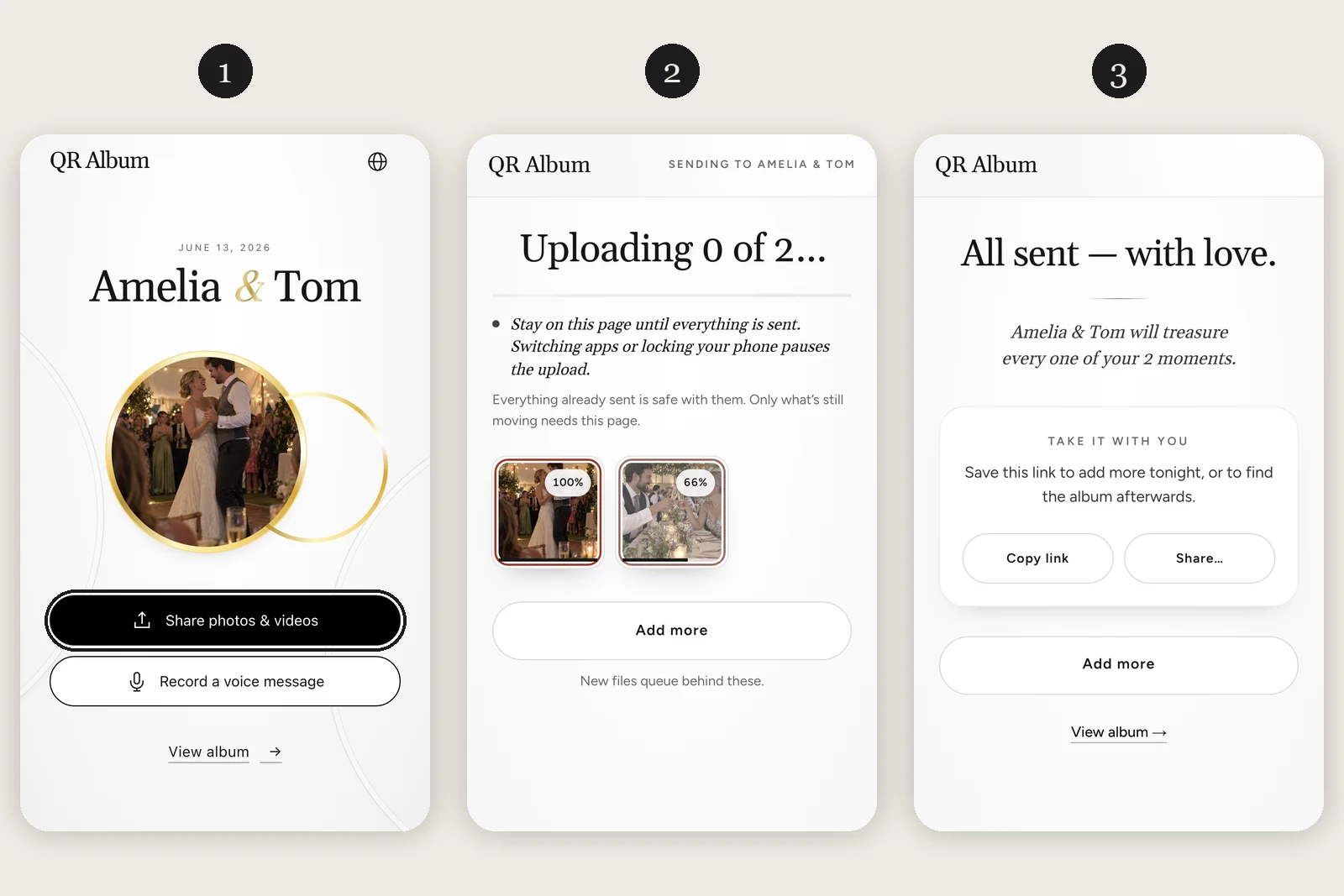
- Scan: guests open the phone camera, point it at the code and tap the link that appears. Recent iPhones and Android phones read QR codes without an extra app.
- Share: the page shows your names and one large button, “Share photos & videos”. It opens the photo library, and guests pick several photos and videos at once.
- Done: a progress bar shows each file, then a thank-you screen confirms it. From there guests can add more, copy the link for later or open the album.
A card with 2 short lines saves most questions: keep the page open until the upload finishes, because locking the phone pauses it, and the link still works the next morning. Guests who would rather talk tap “Record a voice message” on the same page.
The set-up gets harder for guests when the code leads to an app download, a sign-up form or a shared cloud album that asks them to log in. Each extra screen before the upload button is a point where some guests give up.
Build the guest route before you design the card
A wedding QR code for photos should open the upload screen in a phone browser and reach a visible success message within 3 actions. If it lands on a home page, asks for an app, or requires the host’s login, it is the wrong link for a place card.
Choose the destination before choosing a typeface. A shared cloud album may suit a small family who already use the same account system. A dedicated event album suits a broader guest list because the upload page can be separated from the organiser dashboard. The relevant question is not whether the QR code is free. It is whether a guest can add a file without borrowing your permissions.
Open the final link in a private browser window. Then hand it to somebody who has never seen the setup. Ask them to add a fresh photograph without explaining the screen. Watch for the exact point where they pause. That pause is better evidence than a preview inside the account that created the event.
Run the same check on an iPhone and an Android phone, on Wi-Fi and mobile data. Upload from the camera roll, take a new picture, wait for confirmation and check that the original arrives in the host view. If moderation is switched on, make sure the guest still receives a success message even though the image is not public yet.
Keep a short web address or event code beneath the square. It is not decorative duplication. It is the route for a cracked camera, an older handset or a code printed behind a reflective table number. A guest should never need to find the couple because a scanner did not cooperate.
Map the QR code to the way the venue changes
Use at least 4 placements across the day: welcome area, dining tables, bar and dance-floor edge. The welcome sign creates recognition, the tables allow a quiet test, and the later positions catch evening guests and the photographs taken after the seating plan has stopped mattering.
In a hotel ballroom, duplicate cards are mainly a reminder. In a country house or marquee, they are also a connectivity plan. Walk the venue with the final upload page open. Test the lawn, dining space, bar and any separate room used for dancing. If a weak patch exists, put the backup address on the card and tell guests they can upload later.
Print a real sample rather than scanning from a laptop. Keep the code dark on a plain light field. DENSO WAVE calls the empty border around the modules the Quiet Zone; leave it free of florals, rules and tiny captions. Then scan from the distance at which a seated guest will actually hold the card, under the venue lighting rather than office daylight.
The wording should describe the action. “Scan, choose your photos, add them to our album” beats “Share the love”, because a guest can predict the next screen. Add whether contributions appear immediately or wait for approval. If videos or voice notes are accepted, say so; otherwise guests will assume the square is only for still photographs.
Ask the DJ or master of ceremonies for 1 sentence after the meal and another before the dance floor fills. Point towards the cards. This is especially useful for evening guests who missed the stationery and speeches. The announcement should take less time than explaining the pudding.
Close the loop the morning after
Within 24 hours, check failed uploads, approve or hide contributions, download the originals and send the same upload link in the thank-you message. Many guests choose their best pictures after breakfast, so the collection plan needs a second chance beyond the reception.
Start with the host view. Look for duplicate attempts, files waiting for moderation and a run of missing time that may reveal a dead signal area. Do not judge the system by the gallery card count alone. Open several originals and confirm their dimensions and file types before the printed signs go in the recycling.
Download the archive to 2 places. A hosted gallery is useful for sharing, but it should not be the only copy of an irreplaceable photograph. Keep the original files separately from any compressed versions sent through messaging apps. Record the album closing date in the calendar while the purchase details are still at hand.
Send the plain link once after the wedding. Guests who could not get a signal, left early or took photographs on a separate camera now have a route back. State the deadline and keep the request specific: ask for the ceremony view from their seat, the table photograph or the part of the first dance you could not see.
The useful measure is not how many times the code was displayed. It is whether a guest could complete the upload, recover from failure and contribute later without asking for help. That is why the setup ends with the archive rather than the artwork.
Create the album, print 1 rough card and test it at the venue before ordering the stationery run.
Start a free albumAsked before, answered properly
How do I create a QR code for photo sharing?
Create the shared album first and copy its guest upload link. Use the album service’s QR code or put that tested link into a static QR generator, then print one sample and test it while signed out on both an iPhone and an Android phone before you distribute the cards.
How big should a wedding photo QR code be?
There is no single size for every distance and printer. Print the final card, preserve the clear border around the code and test it from the guest’s real scanning distance under venue lighting. A code that works on a monitor is not a print test.
Where should the code go at a UK wedding?
Use the welcome area, dining tables, bar and dance-floor edge. That covers day guests, evening guests and the point when people leave their assigned seats. Add the plain link beneath the code for weak signal or scanner problems.
Should guests need an app?
The phone camera can scan the code, but the destination decides what happens next. For the broadest guest list, test a browser upload that needs no organiser login. If your chosen album requires an account, state that before printing.
How do guests scan the wedding QR code?
With the phone camera. They point it at the code and tap the link that appears; on Android phones this can also run through Google Lens. With QR Album, the album then opens in the browser, and guests share photos without an app or an account.